Teach on ByteByteGo

Build with
Claude Code.

Start Enrollment

2-Day Intensive · Cohort-Based Course · Next Cohort: May 28–29, 2026

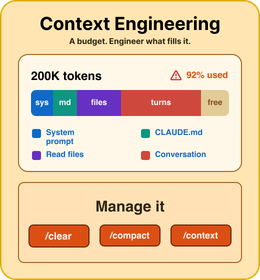
Context engineering card showing Claude Code token budget, prompt context, memory files, and output quality.
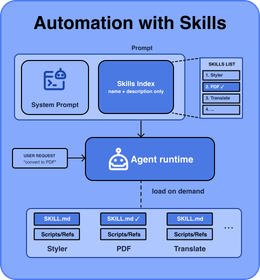
Automation with skills card showing prompts, system prompts, the skill index, an agent runtime, and reusable SKILL.md files.
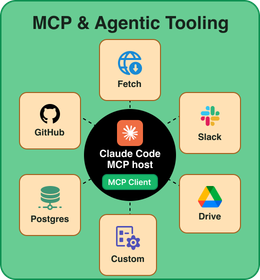
MCP and agentic tooling card showing Claude Code connected to GitHub, Postgres, Slack, Drive, Fetch, and custom MCP clients.
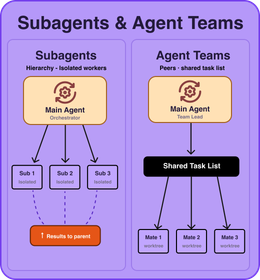
Subagents and agent teams card comparing isolated subagents with peer agents sharing a task list.
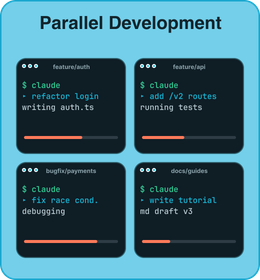
Parallel development card showing multiple Claude Code workstreams running in separate feature branches.
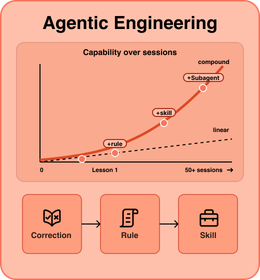
Agentic engineering card showing capability growth over sessions through correction, rule, and skill loops.

Meet Your Instructor:

John Kim profile photo

John Kim

John Kim is a Staff Software Engineer at Meta with over a decade of industry experience across mobile, cloud, and full stack web development. Inside Meta, he has trained hundreds of engineers on how to use Claude Code effectively, moving teams beyond AI autocomplete and into real agentic workflows that ship code to production.

In this course, John distills everything he has learned, from the fundamentals of Claude Code to the advanced production workflows he uses every day. More importantly, he shows how Claude Code fits into the bigger shift happening in our industry: the rise of agentic engineering. By the end, students don't just know the tool. They think like an agentic engineer.

Start Enrollment

Course Outline
(Claude Code)

Session 1
Thursday, May 28, 20265-8 PM PTLive

Claude Code Fundamentals

Claude Code Basics

  • The agentic loop (gather → act → verify)
  • Installation and your first interactive session
  • Slash commands and keyboard shortcuts
  • The permission system (Default, acceptEdits, plan, dontAsk, bypassPermissions)

Context Engineering

  • The context window as a finite working memory
  • The "fresh and condensed" principle
  • Context management commands
  • Layers of memory: CLAUDE.md, Second Brain, Auto Memory
  • Lazy loading

Automation with Skills

  • Skills as reusable workflows and the anatomy of a SKILL.md
  • Skills creation vs. Built-in skills
  • Composability (skills that call other skills)
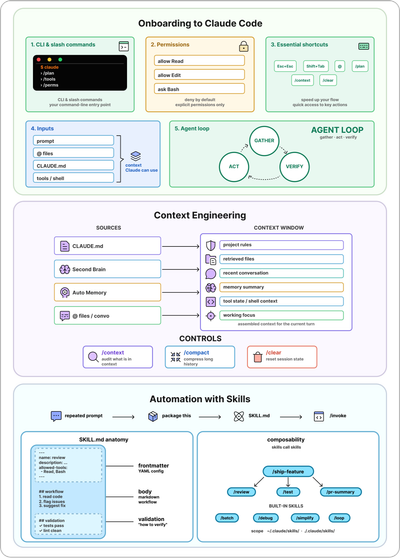
Visual diagrams for Claude Code onboarding, context engineering, and automation with skills.
Assignments
Self-pacedRecorded walkthrough + solution included

Practice the Foundations

Onboard to a New Codebase

  • Point Claude Code at an unfamiliar repo
  • Use plan mode to explore before acting
  • Produce a useful artifact: roast, architecture doc, onboarding guide, or test gap analysis
  • Verification

CLAUDE.md (the mesh walkthrough)

  • Initialize CLAUDE.md
  • Write canonical patterns and migrate the legacy code
  • Build a search feature from a senior-engineer spec on clean conventions
  • Translate a designer email (violet/lime accents) into a durable rule

Skill from a real workflow (log triage)

  • Take stock of a UI-only log archive and identify the automation gap
  • Add an API endpoint to expose the tool to Claude
  • Author a markdown report template using documented placeholders
  • Run the pipeline manually: curl → parse → filter → categorize → aggregate → render
  • Wrap the entire flow as a new skill: /triage-logs <log-id>
  • Run the skill on a fresh log with no re-prompting
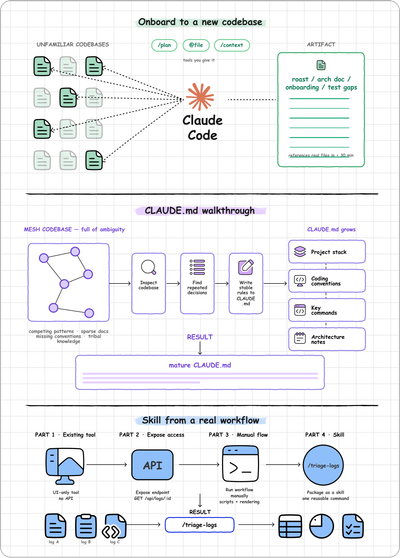
Visual diagrams for onboarding to a new codebase, a CLAUDE.md walkthrough, and packaging log triage as a skill.
Session 2
Friday, May 29, 20265-8 PM PTLive

Scaling Up with MCPs, Parallel Agents, and Agentic Engineering

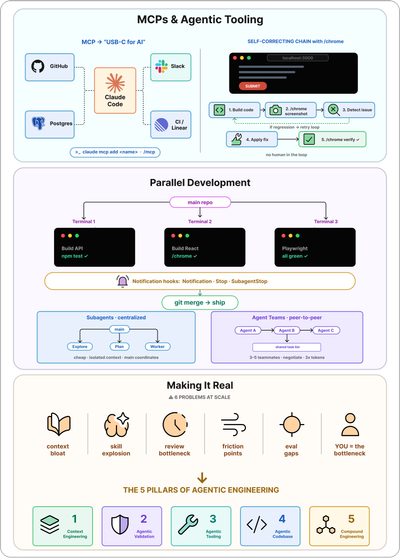
MCPs, CLIs, and Agentic Tooling

  • Model Context Protocol (MCP) and installation
  • When NOT to use MCP (token cost, output limits, signal-to-noise)
  • Browser automation with /chrome (navigate, screenshot, read console, record GIFs)
  • The self-correcting chain (build → screenshot → detect → fix → verify, no human in the middle)
  • Agentic engineering
  • Hook lifecycle

Parallel Development and Agentic Validation

  • Git worktrees with claude --worktree for safe parallel isolation
  • The multi-agent workflow (managing a team of Claudes)
  • Subagents (centralized, lower-cost) vs Agent Teams (peer-to-peer, higher-cost)
  • Notification hooks (Notification, Stop, SubagentStop, StopFailure)
  • /chrome in parallel workflows for automated visual regression

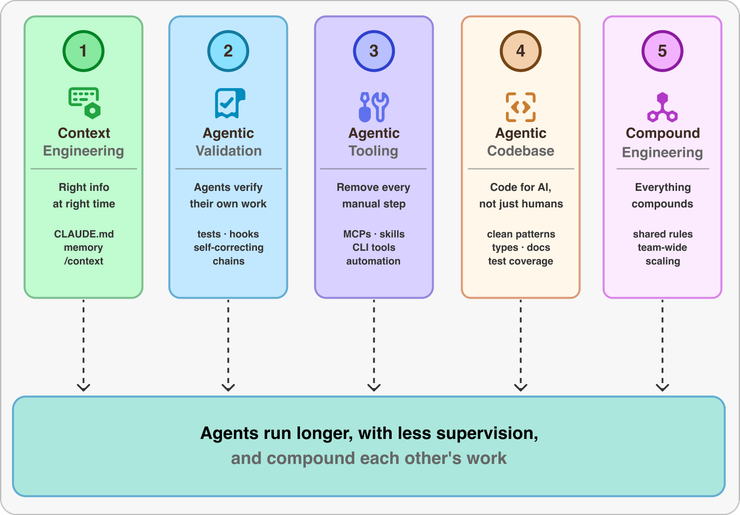
The Five Pillars of Agentic Engineering

  • Common challenges at scale (context bloat, skill explosion, review bottleneck, friction points, evaluation gaps, you-as-the-bottleneck)
  • Techniques to build at scale
  • Compound engineering
  • Auditing your codebase for AI-readiness
  • Designing harnesses to eliminate friction
Visual diagrams for MCP and self-correcting chains, parallel development, and making agentic engineering real.
Assignments
Self-pacedRecorded walkthrough + solution included

Build at Scale

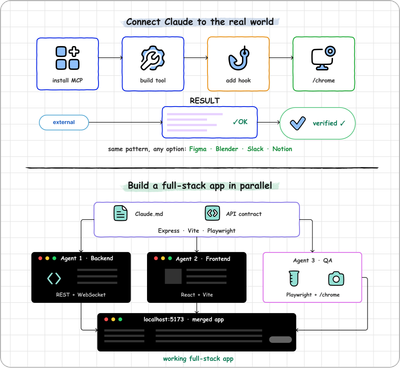
Connect Claude to the Real World with MCPs

  • Install MCP servers (Figma, Blender, Slack, or Notion)
  • Build a tool that reads from and writes to an external system via MCP
  • Add validation hooks that check the tool's output automatically
  • Use /chrome to visually verify the built interface or output

Build a Full-Stack App in Parallel

  • Set up a shared CLAUDE.md with stack, ports, and API contract
  • Run Claude instances simultaneously in separate worktrees (backend, frontend, tests)
  • Decompose a full-stack app into independent tasks suitable for parallel agents
  • Merge worktree branches together, resolving at least one conflict in the process
  • Use /chrome to validate the merged frontend renders and functions correctly

Capstone

  • Pick a project you actually want to ship: your own repo, a side project, or one of three starter PRDs (CodeCoach, Korridor, or Wordle iOS). Your stack, your language.
  • Write a CLAUDE.md, scope .claude/rules/, and build a Second Brain so Claude never has to ask for context.
  • Set up a validation harness with tests, linting, hooks, and /chrome so Claude can self-check and self-correct.
  • Wire up agentic tooling, including MCPs, 2–3 reusable skills, and project slash commands that help your agents do more on your behalf.
  • Define agent team roles and accelerate your development workflow.
Visual diagrams for connecting Claude to the real world, building a full-stack app in parallel, and running the full loop on a project.
Office Hour (Q/A)
Thursday, June 4, 20265-7 PM PTLive

Bring your questions

Illustration of a live office hour Q&A conversation.
Start Enrollment

Is this course for you?

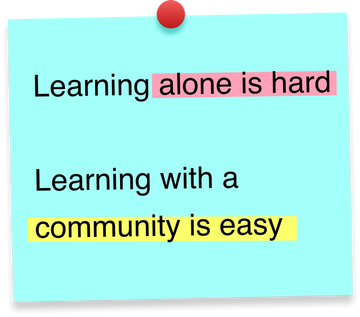
Learning alone is hard. Learning with a community is easy.

If you want to learn Claude Code from scratch,

this is for you!

If you've been using it but want a serious level-up,

this is for you!

If you want to master advanced
agentic workflows and multi-agent
patterns,

this is for you!

If you want to ship production-grade
apps end-to-end,

this is for you!

If you are tired of learning alone,

this is for you!
Start Enrollment

Course Highlights

Structured, Hands-On Path

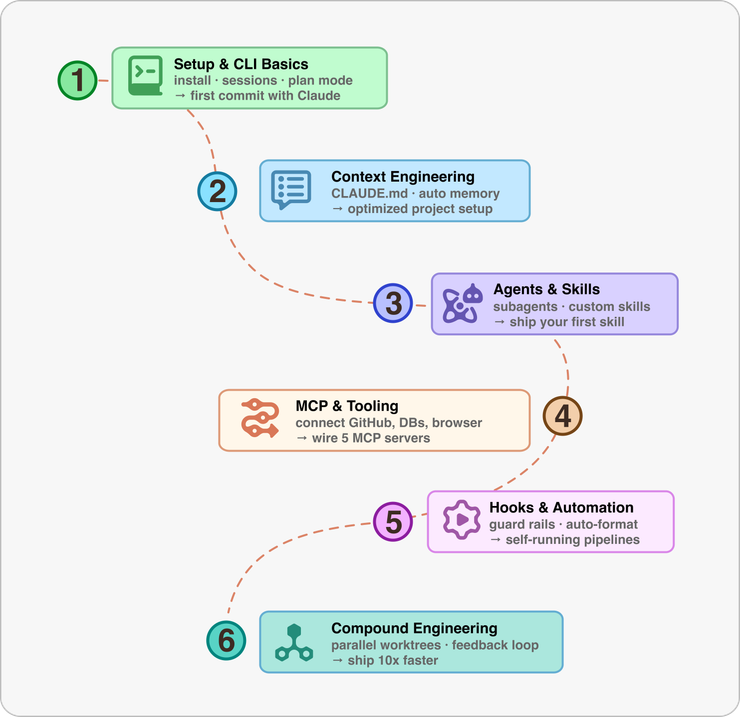
A six-step Claude Code learning path from setup and CLI basics through compound engineering.

Intuitive, Visual Explanations

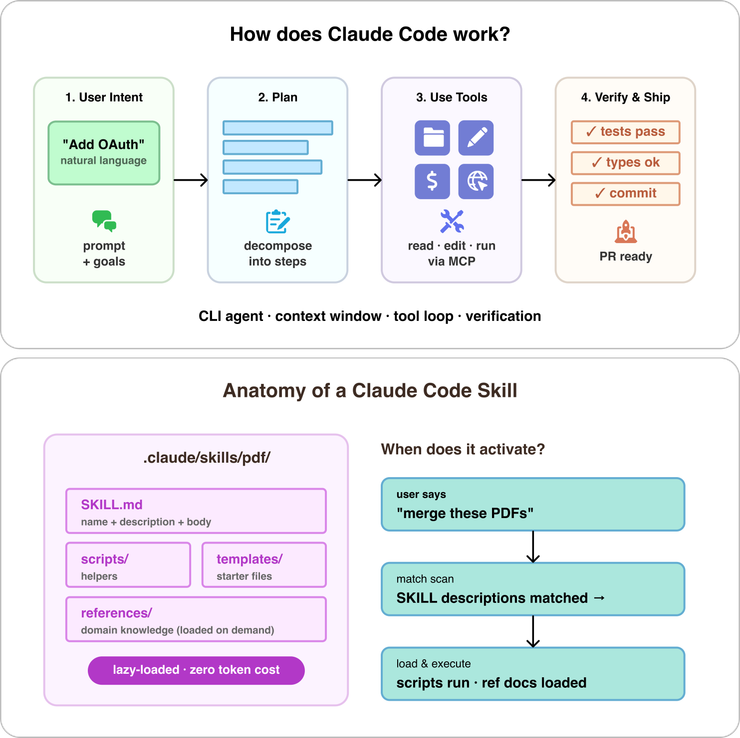
Visual explanation of the Claude Code loop from user intent to planning, tool use, verification, and shipping.

Production Debugging Workflows

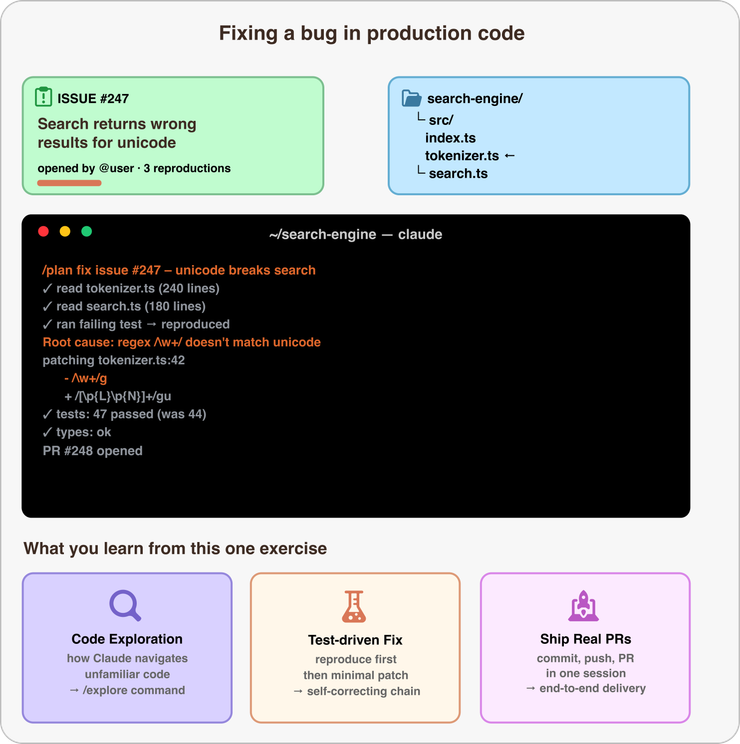
Example of Claude Code fixing a production bug by reproducing a failing test, patching code, and opening a pull request.

Beginner-Friendly Code You Can Run

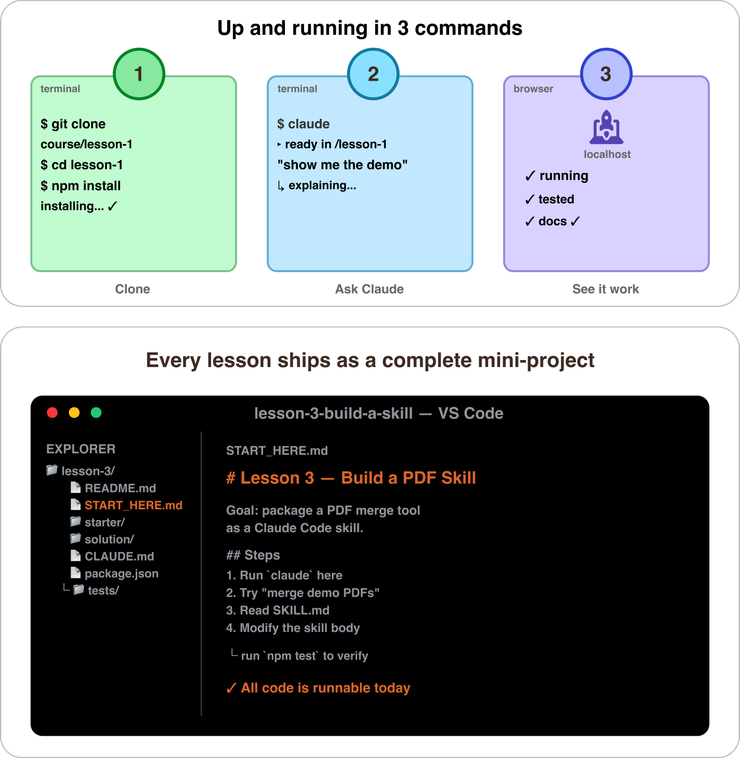
A runnable lesson workspace showing a terminal and project files for a Claude Code skill exercise.

What You’ll Get

Live & Interactive Sessions

Learn directly from the instructor in real time. Ask questions, receive feedback, and stay engaged.

Lifetime Access to Course Content

Revisit lessons, recordings, and other resources anytime.

Peer Community

Stay motivated and accountable with a group of peers who are learning alongside you.

Certificate of Completion

Showcase your achievement on LinkedIn. Proof that you’ve leveled up with real-world skills.

The ByteByteGo Guarantee

If you're not 100% satisfied after the first live session, you can request a full refund before the second session. No questions asked.

Prerequisites

FAQS

What if I miss a live session?

Every session is recorded, so you can catch up anytime that works for you.

What's the time commitment?

This is a 2-day intensive. You'll join two live sessions of 3 hours each (6 hours total), plus 2–4 hours of assignments to practice what you've learned. Plan for roughly 8–10 hours overall.

What’s the refund policy?

If you're not 100% satisfied after the first live session, you can request a full refund before the second session begins by emailing build-with-claude-code@bytebytego.com. No questions asked.

Start Enrollment